该命令用来部署基于CSE-SDK开发的微服务以及管理进程生命周期。
工具/原料
安装ServiceStage
在ServiceStage部署微服务
方法/步骤
命令格式
安装服务
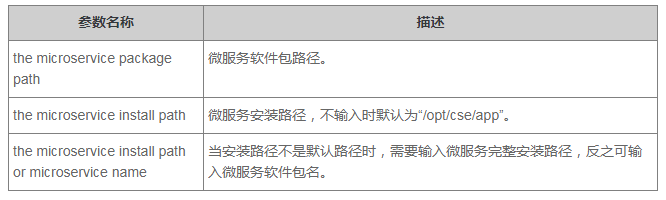
cse_tools.sh install <the microservice package path> <the microservice install path>
启动服务
cse_tools.sh start <the microservice install path or microservice name>
停止服务
cse_tools.sh stop <the microservice install path or microservice name>
查询服务进程状态
cse_tools.sh status <the microservice install path or microservice name>
卸载服务
cse_tools.sh uninstall <the microservice install path or microservice name>
命令获取
https://cse-bucket.obs.myhwclouds.com/Packages/cse_tools.sh
参数说明
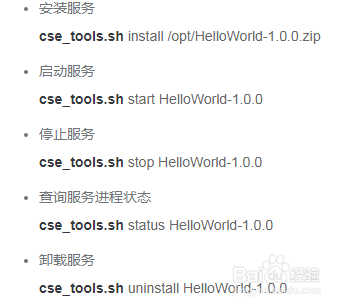
使用示例
注意事项
该命令默认安装服务路径/opt/cse/app。
该命令默认安装jdk版本为1.8.0_151,安装路径/opt/cse/java。
该命令默认安装jdk版本为1.8.0_151,安装路径/opt/cse/java。
该命令只能用root用户运行。