1、打开eclipse
选择,左上角windows --preferences,弹出对话框
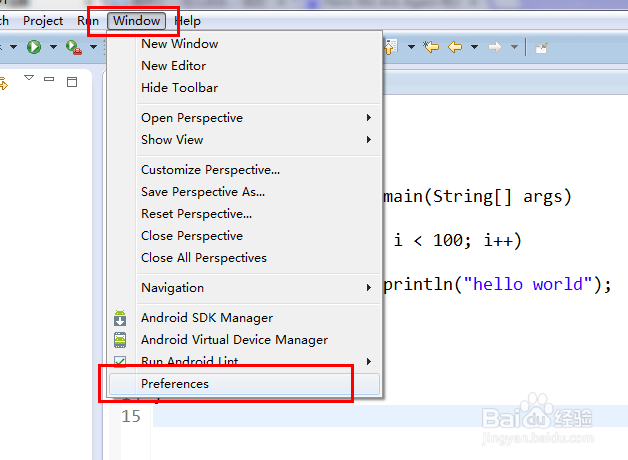
2、选择 编码风格
找到样式
java --- code style -- 找到 formatter, 选择 new

3、自定义一个名字“xxx”,确定, ---选择edit
定义一个新的名称,在编辑

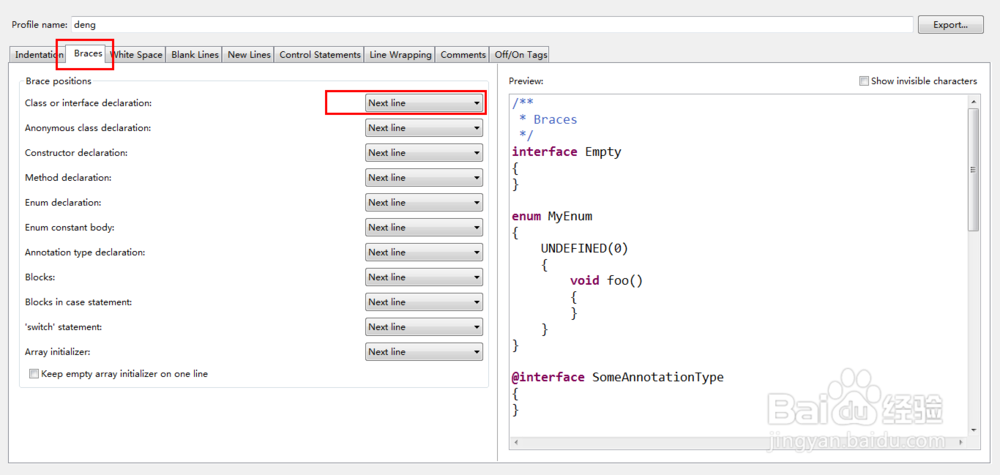
4、选择 braces(大括号)
可以选择同一的风格
单击下拉菜单,可以选择 Next line 或者 the same line
THe next line
{
}

1、打开eclipse
选择,左上角windows --preferences,弹出对话框
2、选择 编码风格
找到样式
java --- code style -- 找到 formatter, 选择 new
3、自定义一个名字“xxx”,确定, ---选择edit
定义一个新的名称,在编辑
4、选择 braces(大括号)
可以选择同一的风格
单击下拉菜单,可以选择 Next line 或者 the same line
THe next line
{
}