1、查看当前系统版本方法
[root@localhost ~]# cat /etc/redhat-release
CentOS Linux release 8.1.1911 (Core)
[root@localhost ~]#

2、xz文件分两步解压
[root@localhost ~]# xz -d Python-3.8.2.tar.xz
[root@localhost ~]# ll Python-3.8.2.tar
-rw-r--r-- 1 root root 87193600 Apr 11 22:49 Python-3.8.2.tar
[root@localhost ~]# tar xf Python-3.8.2.tar
[root@localhost ~]#

3、没有gcc编译的时候会报错的
yum install gcc -y

4、安装完成gcc后继续编译安装
./configure --prefix=/usr/local/python3.8.2

5、make && make install 之前先yum install make -y。因为操作系统是最小化安装的。

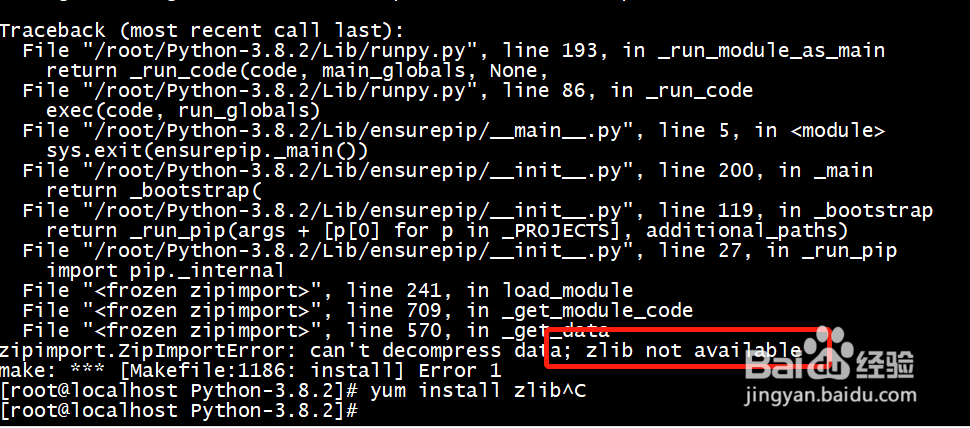
6、缺少zlib包,报错了先安装zlib然后继续make
yum install zlib* -y
最小化安装操作系统真不容易啊
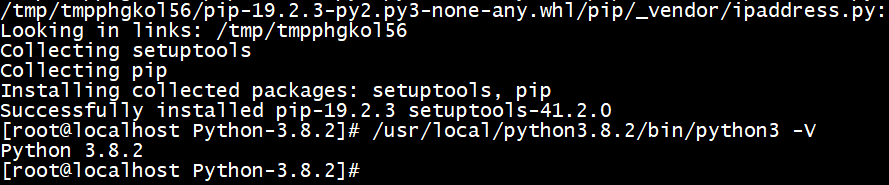
7、出现“Successfully”和版本号表明安装python3.8.2成功了